Optional GST & Custom Invoice Numbering
Enable or disable GST anytime. Configure your GSTIN, custom invoice prefix, tax percentages (CGST/SGST/IGST), and invoice footer terms.
Speed up reception checkout with a POS billing system built specifically for salons and spas. Bill services and retail products together, attribute stylists, apply membership or promotional discounts, and print or download clean invoices.
Whether you are checking out a quick ₹250 haircut or a ₹15,000 bridal package with retail aftercare products, Salon Point POS keeps billing effortless.
Generic billing software struggles when a client gets three different services from two different stylists, buys a bottle of serum, and redeems a membership discount. Salon Point POS is purpose-built for salon workflows—allowing you to select services, assign the performing stylist per line item, include retail shop items, and apply flat or percentage discounts cleanly.
Every completed invoice automatically updates your daily revenue dashboard, deducts sold shop inventory, credits the stylist’s performance log, and attaches the bill to the customer’s permanent record.
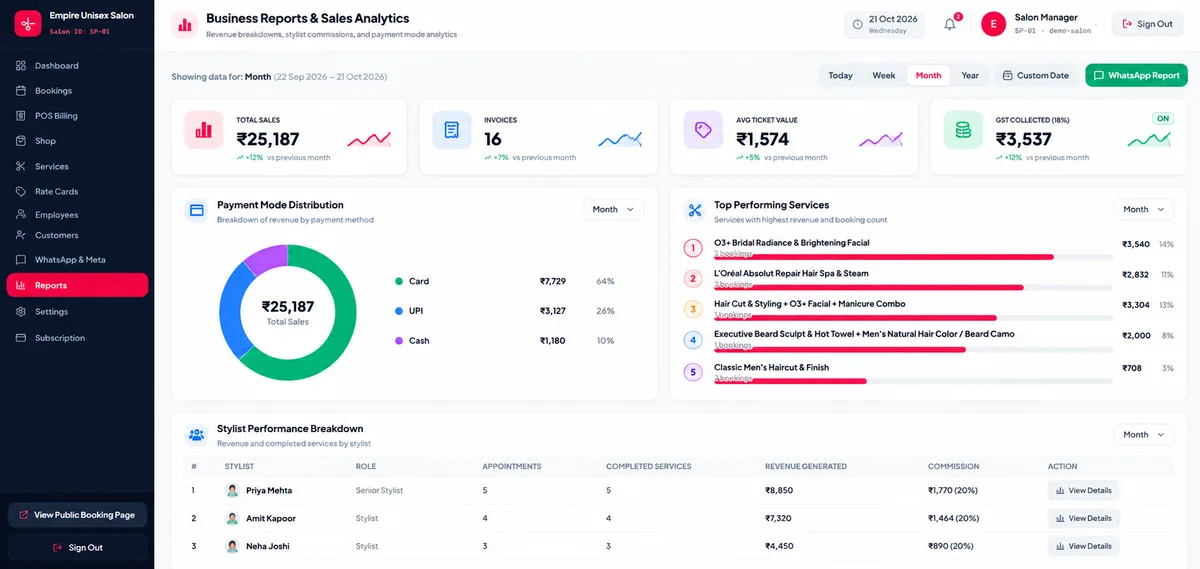
Enable or disable GST anytime. Configure your GSTIN, custom invoice prefix, tax percentages (CGST/SGST/IGST), and invoice footer terms.
Apply special festive rate cards, coupon discounts, or active client membership benefits automatically during checkout.
Generate clean, itemized tax invoices and thermal/A4 print-ready receipts showing your salon branding, service breakdown, and payment mode.
Eliminate cash drawer confusion by filtering daily collections across Cash, UPI, and Card payments in real time.
Yes. By default, GST is turned off for newly registered salons so you can issue clean, straightforward bills immediately. If your salon is GST-registered, you can enable GST in Settings and enter your GSTIN.
Yes. Whenever you add a product from your Shop inventory onto a POS bill, Salon Point automatically reduces the available stock count so your inventory stays accurate.
Yes. You can open POS Billing anytime, enter or select the walk-in customer, pick their services and products, choose the payment method, and generate the invoice immediately.