Duration-Aware Slot Generation
Automatically calculates total duration when a client selects multiple services and prevents bookings that would extend past closing time or into break hours.
Let clients book appointments online 24/7 through your salon’s own branded link while your reception desk manages walk-ins, stylist assignments, and slot capacity without double bookings.
No app download or password required for your salon clients—they book in four quick taps from Instagram, Google Maps, or WhatsApp bio links.
When you register on Salon Point, your salon immediately gets a customizable public booking page (e.g., salonpoint.in/your-salon-name). Customers can browse your service menu, filter by Men or Women services, view transparent pricing and service durations, pick their preferred stylist (or any available stylist), and select an open date and time slot.
Behind the scenes, Salon Point’s scheduling engine verifies your salon’s opening and closing hours, daily break windows, active salon holidays, approved employee leaves, and existing overlapping appointments before confirming a slot.
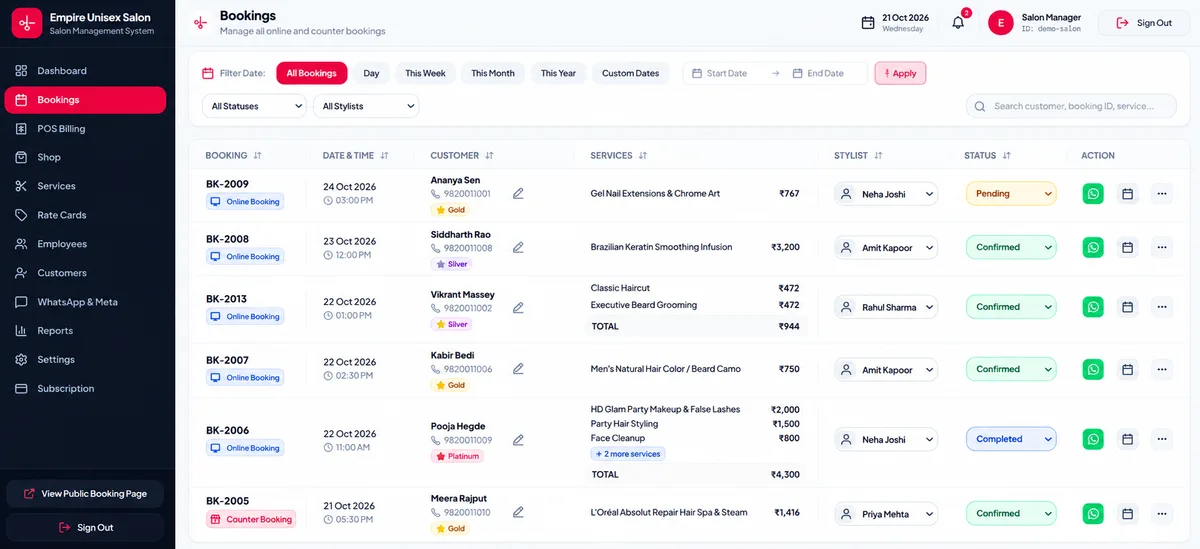
Automatically calculates total duration when a client selects multiple services and prevents bookings that would extend past closing time or into break hours.
Configure your booking capacity based on active rostered stylists or set custom maximum bookings per time slot in Salon Settings.
Add festival closures or individual stylist leave dates so clients can only book staff who are actually working on that date.
When a booked client finishes their appointment, click "Generate Bill" to pre-fill their services, stylist, and details directly in the POS terminal.
No. Your public salon booking page works instantly in any mobile or desktop web browser. You can paste your link on your Instagram bio, Google Business Profile, or print a QR code standee for your salon.
Yes. In Salon Settings, you can set your Salon Service Type to Men Only, Women Only, or Unisex. Your public booking page and service filters automatically adapt to your selection.
Yes. Your reception desk can add phone or walk-in bookings in seconds, reschedule existing appointments, update status (Confirmed, Completed, Cancelled), or bill a walk-in directly via POS.