Salon Analytics & Growth · 6 min read · Updated 2026-10-29
How to Track Daily Salon Revenue, Retail Inventory, and Staff Commissions
High footfall does not always mean high profit. Learn how to separate service revenue from product sales, monitor top-performing services, and track stylist productivity.
The 4 Numbers Every Salon Owner Should Check Daily
Many salon owners only look at total daily cash and UPI collections. While total collection tells you how busy the register was, it hides critical operational details that determine your actual monthly profit.
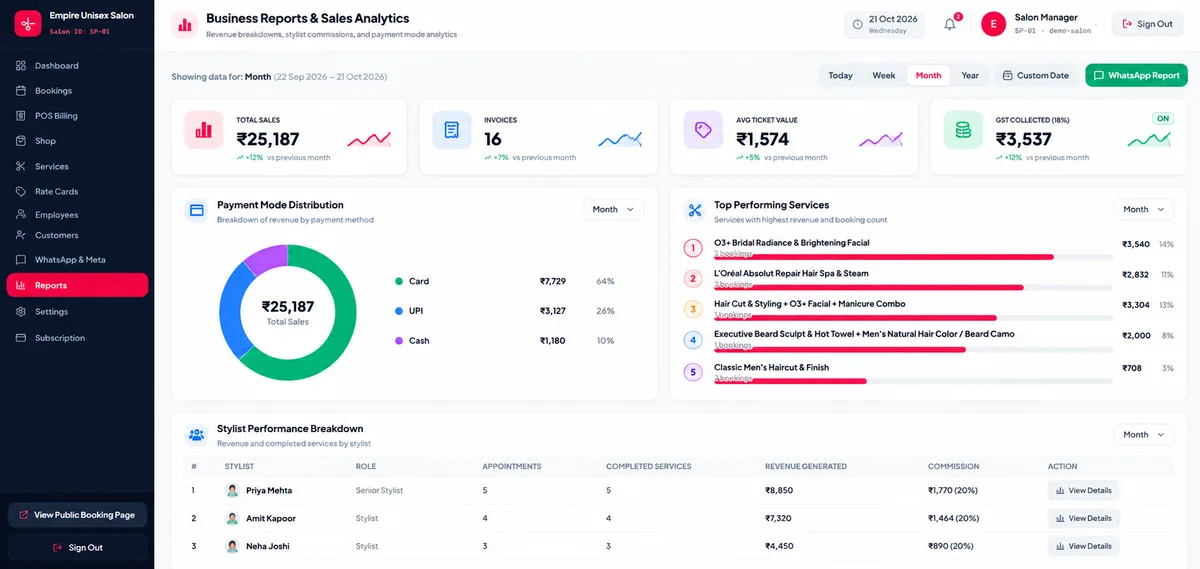
To run a profitable salon or spa, review four metrics consistently: Completed Bookings vs. Cancellations, Service Revenue vs. Retail Shop Revenue, Average Ticket Size per Client, and Revenue Generated per Stylist.
- Daily & Monthly Total Revenue broken down by payment mode (UPI, Cash, Card).
- Top-performing service categories by booking volume and revenue share.
- Employee-wise completed appointments, revenue contribution, and commission calculation.
- Retail shop inventory movement, purchase costs, and low-stock alerts.
Tracking Stylist Commissions Without End-of-Month Disputes
Calculating staff incentives manually from paper bills at the end of the month takes hours and often leads to disagreements over who performed which service.
When every appointment and POS invoice records the assigned stylist at checkout, Salon Point’s Employee & Reports modules automatically aggregate each team member’s completed services, total revenue generated, and configured commission percentage.
Controlling Back-Bar and Retail Shop Stock Leakage
Shampoos, hair masks, developer creams, and retail serums represent one of a salon’s largest recurring costs. Using the built-in Shop module to record supplier purchases, current stock quantities, and retail sales ensures products do not go missing unnoticed.
Frequently Asked Questions
Can I filter salon reports by custom date ranges?
Yes. Salon Point Reports let you inspect daily, weekly, monthly, or custom date-range performance across revenue, bookings, services, and staff members.